COMP 4900 Academic and Professional Development
Training Module: Git & GitHub
Objectives and Intended Learning Outcomes
The objective of this training module is to enhance your understanding of Git and version control. After completing this module, you should be able to:
- Perform basic Git operations: Execute fundamental commands to manage your code repository effectively.
- Apply version control principles: Utilize version control techniques to track changes in your projects and collaborate with others.
- Build a strong foundation for advanced courses: Develop essential version control skills that will prepare you for more advanced topics.
- Explore GitHub features: Leverage GitHub’s capabilities to enhance your coding workflow and project management.
Introduction
In this module, we will explore Git and GitHub, two essential tools in modern software engineering. Understanding these tools is crucial for effective version control and collaboration in software development.
Before we delve deeper into Git and GitHub, it's important to understand what version control is.
What is Version Control?
Version control is a system that tracks changes to files over time, allowing you to retrieve specific versions at a later date. A Version Control System (VCS) enables you to:
- Restore a specific file to a previous state
- Roll back the entire project to a previous state
- Track changes over time
- Identify who last modified the files
What is Git?
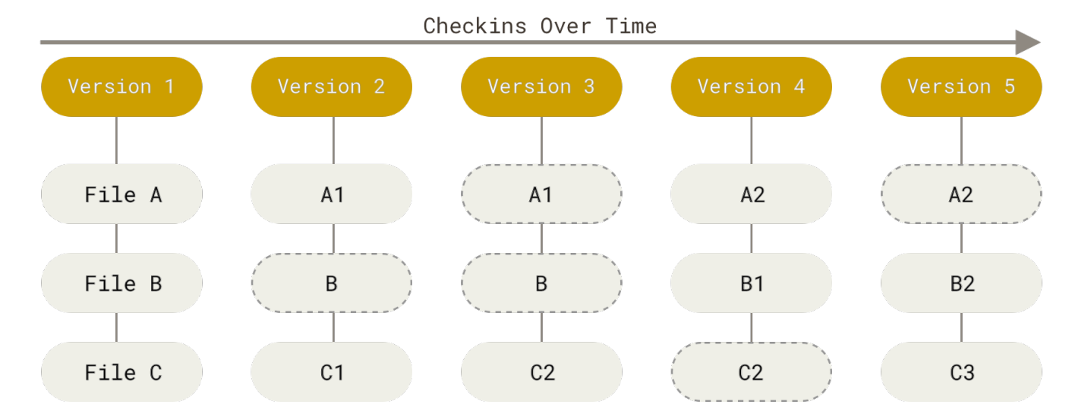
Git is a distributed version control system that helps track changes in your code over time.
Think of the changes as a stream of snapshots, each representing the state of your project
at a specific point.
A Git repository contains a hidden .git folder within the project directory,
which stores all the version history and metadata.
What is GitHub?
GitHub is a website and cloud-based service designed to help you save and manage your code and projects. It is the most commonly used platform for hosting repositories, allowing you to share your code online with others. Additionally, GitHub can serve as a valuable tool for showcasing your work, acting as a developer's resume.

With this foundation, in this module, you will learn a complete workflow: setting up Git, creating and cloning repositories, making meaningful commits, working with branches, resolving basic merge conflicts (self-learn), and collaborating using pull requests.
By mastering Git and GitHub, you will enhance your ability to manage projects effectively and collaborate with others in the software development process.
Installation
Description
Module Overview
This training module combines concept review and hands-on practice. You will progress from basic repository operations to team collaboration workflows that mirror real software projects.
Task 1 - Set up Git and create your first repository
Install or verify Git, configure your identity (user.name and user.email),
create a repository, and make your first commit.
Task 2 - Practice daily Git workflow
Use git status, git add, git commit, git log, and
git push to track and publish incremental changes.
Task 3 - Branching and merging
Create a feature branch, implement a small change, merge into main, and handle simple merge
conflicts when needed.
Task 4 - Collaboration with GitHub
Fork or clone a shared repository, open a pull request with clear descriptions, and respond to review feedback professionally.
Resources & Sample I/O
- Official Git documentation: git-scm.com/doc
- Official GitHub documentation: docs.github.com
- Free Pro Git book: git-scm.com/book
- Tutorial source materials: GitHub tutorial repository folder
This module does not require starter code. Your deliverables focus on repository setup, commit history quality, and collaboration workflow evidence.
Sample Command I/O
-
$ git branch
* main

$ git checkout -b feature-greeting
Switched to a new branch 'feature-greeting'

$ git commit -m "Add greeting feature"
[feature-greeting abc1234] Add greeting feature
Submission & Deadline
The training module deadline is to be announced by the instructor.
We will use the online grading system ZINC to grade your lab work.
You are required to upload only the required evidence files to ZINC:
README.md(brief summary of steps completed)git-log.txt(exported commit history)- Screenshots or links requested in the module handout
You may submit multiple times before the deadline; only the last submission will be graded. Make sure your submission clearly demonstrates command usage, branching workflow, and repository organization.
Changelog
No changes have been made.Frequently Asked Questions
How is Git different from GitHub?
Git is the version control tool that runs locally. GitHub is a cloud platform that hosts Git repositories and supports collaboration.
What should I do if I get a merge conflict?
Run git status, open conflicted files, resolve the conflict markers manually, then use
git add and git commit to complete the merge.
My code doesn't work / there is an error, can you debug it for me?
As this module is assessed coursework, we cannot complete tasks for you directly.
We can still provide hints and help you reason about the error messages.